Home
BI Smart

Orbit Performance

KPI, target, action-plan and variable-pay management software

Orbit Performance does not replace the ERP. It is where the company tracks targets month by month, discusses results in a meeting and turns what went red into an action plan. Unlimited users and published pricing.

Already have Power BI?

Keep it. Power BI shows the number; Orbit chases whoever has not entered it, keeps the evidence and opens the action. Power BI reads Orbit’s data through the API.

Protheus, Sankhya, Omie, SAP or no ERP

Without Automation, the number is typed in or imported from a spreadsheet, once a month. With Orbit Automation, it arrives on its own from the ERP, IFS, Protheus, Sankhya, Omie, SAP or another. Your industry’s management system or your time-clock system: if it has an API, Automation reads it; if not, it comes in by spreadsheet, once a month. BI Smart does not compete with your ERP.

How much work is it?

One person imports the target spreadsheet and invites the owners. Each one signs in once a month, types the number, attaches the screenshot and submits; the manager approves on the same screen. The number closes by month, quarter or year. The results meeting starts from what turned red, and the action plan tasks come due on their day, for each person.

ISO 9001, IATF 16949

Each KPI keeps the target, the actual, the evidence, who approved it and the corrective action. In an audit, you open the KPI and show the year’s history. Scrap per shift stays on the line; here goes the period close, with the evidence. Orbit does not record the NCR or the 8D: it keeps the KPI and the action with owner, deadline and proof. The root-cause analysis (5 whys, Ishikawa or the customer’s 8D) is attached to the action; effectiveness shows in the following months’ numbers.

Profit sharing and bonuses

Floor, target, cap, weight and gate rule set up once; every number with evidence and approval; the simulator shows each person how much they have already secured. When a manager disagrees, the number shows who entered it, who approved it and when, and a closed month does not reopen. Whoever enters and whoever approves can use the phone, in the browser, with a connection; the simulator too. Each person sees only their own bonus; the table with everyone stays with whoever administers the plan. In the trial, import the months already closed and compare the calculated bonus with the spreadsheet’s.

Where the data lives

Cloud in Brazil (Supabase, São Paulo), isolated per company, with an audit trail. Your company is the controller; BI Smart is the processor. Export to .xlsx and a read API at any time. As evidence, attach the consolidated report, without patient names or sensitive personal data: Orbit keeps numbers and evidence, not medical records.

Does it fit my industry?

What goes in is the number you already ask the manager for, one row per KPI and per unit, with an owner. Metalworking and food: scrap, OEE, yield, on-time delivery and accidents, per line. Auto parts: customer PPM, scrap per cell and OTD. Clinics: exams per day (monthly average), denied claims, NPS and absenteeism per unit. Carrier: OTIF, damage and cost per km per branch. Agribusiness: cost per bag and yield per hectare, per farm. Facilities: SLA per contract. Services and tech: margin per project, billable hours and NPS. The close is by month, quarter or year: a daily KPI comes in as the month’s number, and the operation’s weekly meeting stays where it is; here goes the close, with evidence, for leadership and the bonus.

Branch, unit or group

An area can be a branch, a unit, a client contract or a company of the group, with its own owner; leadership sees them all in the same list, each with its own traffic light. A group under one management, up to 500 people, fits the Company plan. The Group plan is for when each company needs its own environment: separate administrator, approvers, bonus rule and close.

How it works

Orbit Performance, screen by screen

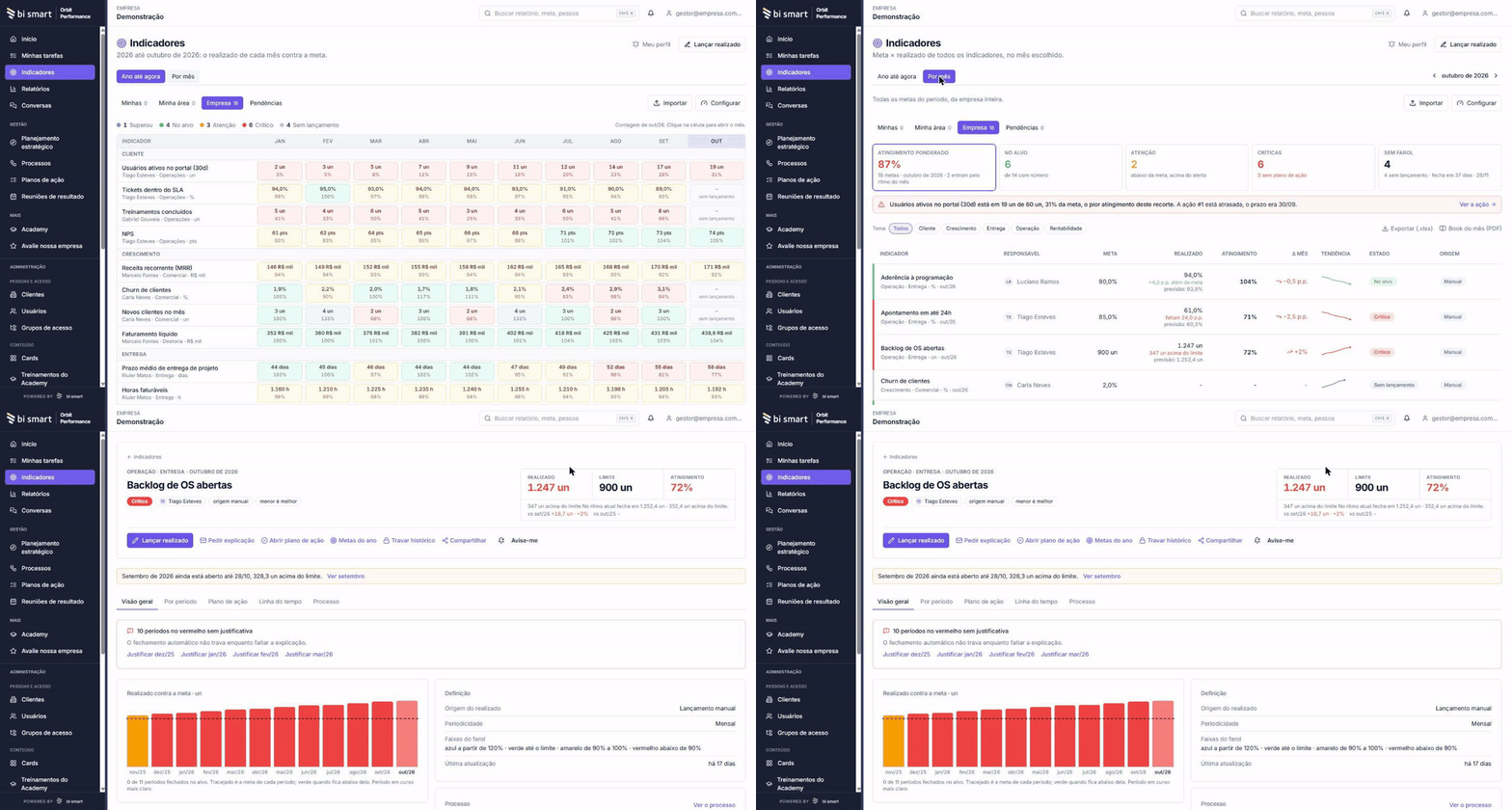
Four screens from the real product. Every month the cycle repeats, and each person sees only the part that is theirs.

Draw the process and see where it jams
01

Draw the process and see where it jams

You draw the process as it really happens (or import the flowchart you already have). Above each step sits the KPI that measures it, in green, yellow or red. If you prefer, skip this part and start with the targets; the process can come later.

Track targets month by month
02

Track targets month by month

Each KPI has an owner, a monthly target and a weight (how much it counts in the department’s result). Whoever enters the number attaches proof, a screenshot, PDF or spreadsheet, and the manager approves. Green hit the target, yellow came close, red fell short. The bands are yours; the default is yellow from 80% of target.

Run the meeting with the agenda ready
03

Run the meeting with the agenda ready

The agenda builds itself from what is red and what nobody entered. Calendar invite, minutes and follow-ups stay in the same place.

Turn red into an action plan
04

Turn red into an action plan

Every miss becomes an action with an owner, a due date and steps, tracked until closed. The action that fixed it stays on the KPI, and next month starts from there.

Recorded in Orbit Performance, in a demo company, in Portuguese. The product also works in English and Spanish.

And when the problem is bigger than an adjustment?

Sometimes the KPI is red because the ERP is misconfigured, maintenance has no plan or the data does not exist. That is where the service comes in: BI Smart’s team implements and solves it.

  • IFS ERP
  • Maintenance (IFS EAM)
  • Data and dashboards
  • Processes and automation
See services

What comes with the product

Everything included in both plans

01

Strategic planning

You say where the company wants to be this year; the system shows which KPIs to track and how much each one weighs in the result.

02

Processes, drawn

Flowchart editor (BPMN standard) with lanes. Imports the .bpmn file exported from Bizagi or another editor, and the KPI sits on top of the step it measures.

03

KPIs and targets

Year matrix by KPI and month, with formula, unit, direction and the status bands. Monthly, quarterly or yearly targets, and the list exports to .xlsx.

04

Number with evidence and approval

Whoever enters the number attaches the evidence and explains the variance; the manager approves. A closed month no longer changes, and spreadsheets come in by import. With Orbit Automation, the number arrives from the ERP every day, with no typing. With the alert on, whoever has not entered yet gets an email three days before close. Each KPI keeps who entered the number, when, the evidence, who approved it and the action tied to the variance: in an audit, you open the KPI and show it on screen.

05

Results meeting

Agenda built from what is red, presentation mode, minutes and a calendar invite.

06

Action plan

Board with owner, deadline, steps and evidence. What is due shows up in each person’s tasks. An action can also start outside a KPI: an audit nonconformity or a customer complaint goes on the same board.

07

Variable pay

Bonus per person, calculated from their targets: below the floor nothing is paid, at target the full amount, above target up to the cap. Each target weighs as set in the planning, one company KPI can act as a gate, and the simulator shows how much each person has already secured.

08

One screen per role

Whoever owns one target sees the target. The manager sees their department and team. Leadership sees the whole company, department by department, with each one’s status. A department can be a branch, a site or a client contract, with its own owner. On desktop and mobile, in the browser, nothing to install.

Implementation with BI Smart

Want help implementing? BI Smart does it with you

The product works on its own. Actual numbers arriving from the ERP with no typing is Orbit Automation, a separate product; guided implementation and dashboards are services. All quoted for your case.

1. Process

We map the real process with the people who run it and with those who coordinate it.

2. KPIs

We define the KPIs that lead to the objective, with target, owner and weight.

3. Connection

We link Orbit Automation to your ERP, from any vendor, so actual numbers arrive without typing.

4. Routine

We run the first results meetings until the cycle moves on its own.

Company
R$ 1,990/month
Group
R$ 4,990/month
Large account
Proposal

What is your case?

Tell us your case or ask for a demo. We reply within one business day with the next step.